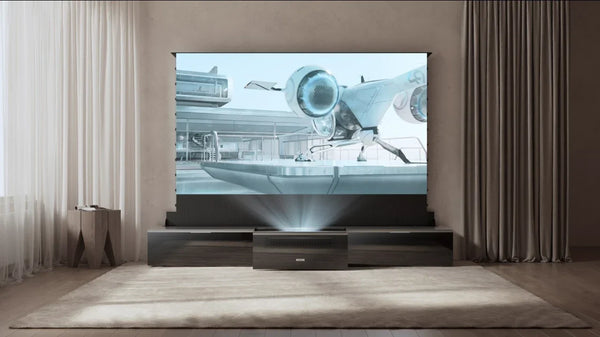
How Big is a 120-Inch Projector Screen? (Exact Dimensions & Room Guide)
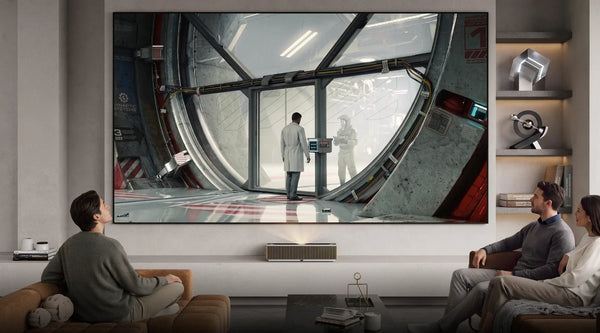
Upgrading to a 120-inch projector screen is thrilling—it is the definitive threshold where a living room transforms into a true cinematic home theater. However, trying to visualize a diagonal measurement on an empty wall can be incredibly frustrating.
Before you start drilling holes or rearranging your furniture, you need exact physical dimensions, not just the diagonal number. This guide cuts through the confusion, providing the exact measurements you need, ideal viewing distances, and expert advice to ensure a 120-inch screen fits perfectly in your space.
The Exact Dimensions of a 120-Inch Projector Screen
Screen sizes are advertised by their diagonal measurement, but to plan your room layout, you need the physical width and height. If you are looking at different aspect ratios, learning exactly how to calculate screen size is your first crucial step.
16:9 Aspect Ratio Measurements (The Home Theater Standard)

For the vast majority of modern setups—including streaming TV shows, playing video games, and watching most movies—you will be using a 16:9 aspect ratio screen.
A standard 120-inch 16:9 projector screen measures exactly:
- Width: 105 inches (266 cm)
- Height: 59 inches (150 cm)
Note: These measurements represent the viewable area. You must add 1 to 3 inches on all sides if you are purchasing a fixed-frame screen with a physical border (bezel).
2.35:1 Aspect Ratio Measurements (The Cinematic Widescreen)
If you are building a dedicated home theater primarily for epic, ultra-widescreen films (anamorphic format), you might opt for a 2.35:1 aspect ratio.
A 120-inch 2.35:1 projector screen measures roughly:
- Width: 110 inches (280 cm)
- Height: 47 inches (119 cm)
Will a 120-Inch Screen Fit in Your Room?
Knowing the dimensions is only half the battle. You also need to ensure the screen physically and practically fits into a standard living room setup without causing physical discomfort.
Minimum Wall Space and Ceiling Clearance Needed
When measuring your wall, do not just measure the 105x59 inch rectangle. You need to account for the vertical footprint:
- Ceiling Clearance: Leave at least a few inches of breathing room between the top of the screen frame and your ceiling to avoid a cramped look.
- Floor Clearance: If you are using a standard 8-foot (96-inch) ceiling, a 59-inch tall screen leaves you with about 37 inches of total vertical space to split between the top and bottom.
- Speaker Placement: Ensure you have enough room beneath the screen (usually 20 to 30 inches) to place a media console or a center-channel speaker without blocking the picture.
If you lack the continuous wall space or want to install a screen in front of a window, a floor-rising model—such as the AWOL Vision Cinematic+ ALR Floor Rising Screen—is a highly practical solution, as it deploys upward from a base only when needed.
The Ideal Viewing Distance for a 120-Inch Screen
Sitting too close to a screen this large results in the "tennis match effect," where you have to physically turn your head to follow the action, leading to rapid eye and neck strain.
Based on standards from the Society of Motion Picture and Television Engineers (SMPTE) and THX:
- Minimum Viewing Distance: 11.5 feet (138 inches)
- Ideal "Sweet Spot": 12 to 15 feet (144 to 180 inches)
At 12 to 15 feet, the 120-inch screen fills your peripheral vision perfectly, offering deep immersion while keeping the entire image comfortably within your field of view.
Matching Your Projector and Environment to a 120-Inch Screen

A massive screen requires the right projector and the right screen material to prevent the image from looking washed out. As the image gets larger, the projector's light is spread thinner. Consulting a dedicated projector and screen buying guide can help you pair these elements perfectly.
Understanding Throw Distance
Make sure your projector can physically cast a 120-inch image from where you plan to mount it:
- Standard Throw Projectors: Usually need 10 to 15 feet of distance from the lens to the screen to create a 120-inch image.
- Ultra-Short Throw (UST) Projectors: Can cast a 120-inch image while sitting just inches away from the wall directly beneath the screen, solving the issue of long-distance wiring.
Managing Room Light with Screen Materials

A 120-inch image acts like a giant mirror for ambient light in your room. If you do not have a dedicated, pitch-black theater, choosing the right screen material is just as important as the projector's brightness.
Using the AWOL Vision screen lineup as an excellent example of how material impacts performance:
- For Pure Dark Rooms: A standard Matte White Screen (like AWOL's Premium-Grade PVC with a 1.3 peak gain) is ideal. It diffuses light evenly and offers the best picture quality when all lights are off.
- For Rooms with Overhead Lighting: If you want to watch with the lights on, you need an Ambient Light Rejecting (ALR) screen. Screens like the AWOL Cinematic ALR use a specialized grid structure to absorb up to 95% of overhead light, preserving contrast.
- For Daytime Viewing with Windows: If your 120-inch screen is in a bright living room, look for advanced daylight materials. For instance, AWOL's Daylight ALR Screen utilizes a Fresnel PET structure that actively resists 85% of both ceiling and side light, keeping the picture vibrant even during the day.
Frequently Asked Questions (FAQ)
Is a 120-inch projector screen too large for a small room?
If you cannot sit at least 11.5 feet away from the screen, a 120-inch display will likely be too large and cause eye fatigue. For rooms where seating is 9 to 10 feet from the wall, scaling down to a 100-inch screen is highly recommended for viewing comfort.
How big is a 110-inch projector screen compared to a 120-inch?
A 110-inch screen in a 16:9 aspect ratio is approximately 96 inches wide and 54 inches tall. Upgrading from 110 to 120 inches gives you about 9 extra inches of width and 5 extra inches of height, which creates a noticeably larger surface area.
Is a 120-inch projector big enough?
For the vast majority of residential homes, a 120-inch screen is considered the gold standard for home theater setups. It is large enough to dwarf any standard television and provide a true cinematic experience, while still physically fitting comfortably on most standard-height living room walls.
Be the First to Know
Subscribe for special deals, news, and important product information, and get your exclusive $100 discount.
Related Articles
Playing PS4 on a Projector: Setup, Settings, and Better Gaming
7 Basement Home Theater Ideas with a Style of Their Own
Projector Screen Paint: Is It Worth Painting Your Wall?
A Projector in an Apartment: Make Room for the Screen, Not a Theater
Small Man Cave Ideas: 10 Activity-Based Setups for Limited Space