











































How Many Frames Per Second Can the Human Eye See? (The Real Answer)
It is one of the most heated debates in the tech world. PC gamers swear they can feel the difference between 144Hz and 240Hz, while skeptics—often citing old biology textbooks—insist the human eye "caps out" at 60 frames per second (FPS).
So, who is right?
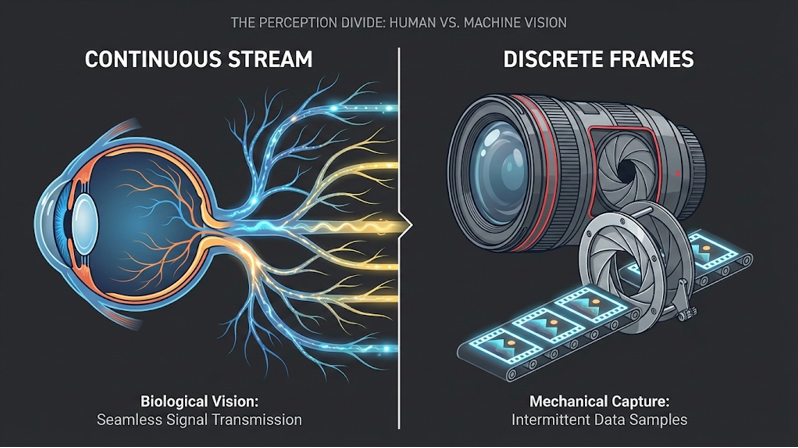
The answer is complex because the human eye isn't a camera. It doesn't take snapshots; it processes a continuous stream of information. However, modern research suggests we can perceive visual changes at speeds far exceeding the old "60 FPS" myth—potentially up to 200+ FPS under the right conditions.
Understanding this limit isn't just trivia—it is the key to setting up your home theater or gaming rig for the smoothest possible experience.
The Short Answer: Can We See More Than 60 FPS?
Yes. The idea that the human eye cannot see more than 30 or 60 FPS is a persistent myth.
While it is true that you might not be able to identify an individual image flashed for a millisecond, your brain absolutely perceives the increased smoothness and responsiveness of higher frame rates.
To understand this, we have to distinguish between two different visual limits:
- Flicker Fusion: The point where a flashing light appears steady (usually around 60Hz).
- Motion Perception: The ability to track a moving object and notice "jitters" or "blur." This limit is significantly higher.
For a deeper dive into the technical definitions, you can read our guide on what exactly a frame rate is.
The Biology: Why Your Eyes Don't Have a "Frame Rate"
Cameras capture the world in a series of still images (frames). Your eyes, however, transmit a constant flow of electrochemical signals to the visual cortex. There is no "shutter" closing between frames.
This transmission happens through two primary types of photoreceptors:
- Cones (Central Vision): These process color and fine detail. They are relatively slow to react.
- Rods (Peripheral Vision): These are color-blind but highly sensitive to motion and light changes.
This is why you often notice the flickering of a fluorescent light or a screen out of the corner of your eye, but not when you look directly at it. Your peripheral vision operates at a much higher "temporal resolution," allowing you to detect motion anomalies that your central vision might miss.
The Science of Speed: Limits of Human Perception

If the eye doesn't have a frame rate, how do we measure its speed? Scientists have tested this by flashing images for incredibly short durations to see if subjects can identify them.
The USAF Pilot Study
In a famous USAF experiment, pilots were shown an image of an aircraft for only 1/220th of a second. Despite the image being visible for less than 5 milliseconds, the pilots could consistently identify the plane. This suggests the eye can process visual information equivalent to at least 220 FPS.
The MIT "13 Millisecond" Study
More recently, researchers at MIT discovered that the brain can identify entire concepts (like a "smiling couple") from images seen for as little as 13 milliseconds. This equates to a processing speed of roughly 75 FPS for complex image recognition, which is far slower than simple motion detection but still faster than the standard 60 FPS many claim is the limit.
Diminishing Returns
While we can see fast motion, there is a limit to how much it matters.
- 60Hz to 120Hz: The difference is "night and day" for almost everyone.
- 120Hz to 240Hz: The difference is perceptible, but subtle.
- 240Hz+: Usually only distinguishable by highly trained competitive gamers.
If you are debating whether to upgrade your setup, check out our blog post on whether 240Hz is actually good for gaming or if you've hit the point of diminishing returns.
Frame Rate in Practice: Movies vs. Gaming
If we can see 200+ FPS, why do movies look fine at 24 FPS? The answer lies in Motion Blur.
The "Cinematic Look" (24 FPS)
Movies are traditionally shot at 24 frames per second. Because the camera shutter stays open for a fraction of a second, any movement is captured with a natural blur. This blur blends the frames together, tricking your brain into seeing smooth motion.
- The Problem: If you watch a 24 FPS movie on a standard TV with "motion smoothing" turned on, the TV artificially inserts fake frames. This removes the blur and creates the "Soap Opera Effect," making a blockbuster movie look like a cheap home video. This is often related to MEMC technology, which is great for sports but controversial for film.
The Gaming Standard (60 FPS, 120 FPS & Beyond)
Video games are different. They render perfect, sharp images instantly. There is no natural motion blur (unless added artificially).
- At 30 FPS: A fast turn in a game looks "choppy" because the gap between perfect frames is too wide.
- At 120 FPS+: The gap is tiny, creating fluid motion and, crucially, reducing input lag.
This distinction is why many gamers are now moving away from small monitors and looking at projectors vs. monitors for gaming, seeking that immersive size without sacrificing speed.
How Display Technology Handles FPS (Hz vs. FPS)
To see these benefits, your display hardware must match your content. This is where "Refresh Rate" (measured in Hz) comes in.
- FPS: How many frames the computer/console produces.
- Hz: How many times the screen updates per second.
If your game is running at 120 FPS but your projector is only 60Hz, you are only seeing 60 frames.
Versatility in High-End Projectors

This is where premium modern displays distinguish themselves—by adapting to the biological needs of your eye depending on the content.
For example, the AWOL Vision LTV-3500 Pro is engineered to handle both ends of this spectrum:
- For Cinema Purists (24 FPS Mode): It features a dedicated 24 FPS mode that locks the refresh rate to match the film source. This prevents judder in film without resorting to the artificial smoothing that ruins the cinematic feel.
- For Gamers (120Hz Turbo Mode): Conversely, when you switch to gaming, it supports 1080p at 120Hz. This lowers the input lag to just 8ms, providing the ultra-fluid response time that the human eye craves during fast-paced competitive gameplay. You can see how this performs in our LTV-3500 Pro gaming realism test.
Quality Over Quantity: When Resolution Matters More
While high frame rates are exciting, they aren't the only metric of quality. For non-interactive content (like movies and TV shows), the human eye is often more sensitive to contrast and color accuracy than raw speed.
A steady 60 FPS image with perfect True 4K resolution, deep blacks, and HDR (High Dynamic Range) will almost always look "better" to the human eye than a washed-out 240 FPS image. This is why properly calibrating your display is critical; even the fastest screen needs the right color space settings to look realistic.
Conclusion
The human eye is an incredible biological instrument that far outperforms the "60 FPS" myth. While we may not process individual frames like a computer, our ability to detect motion and responsiveness extends well into the 100–200 FPS range. The Bottom Line:
- For Movies: Stick to 24 FPS to maintain the director's artistic intent and use a display that supports it natively.
- For Gaming: Push for 120Hz or higher to match your eye's rapid motion tracking capabilities.
FAQ: Rapid Fire Answers
Can the human eye see 1000 FPS?
Theoretically, the eye can detect a light flash at that speed (1ms), but your brain cannot process 1000 distinct images per second. You would likely perceive it as a blur or a continuous beam of light.
Why do neon lights flicker?
Mains electricity oscillates at 50Hz or 60Hz. Because your peripheral vision (rods) is faster than your central vision, you often see this flicker out of the corner of your eye, even though the light looks steady when you stare at it.
Do we see in 4K?
It’s complicated, but the estimated "resolution" of the human eye is roughly 576 megapixels—far beyond 8K. However, this high resolution is concentrated only in the very center of your vision (the fovea).
Be the First to Know
Subscribe for special deals, news, and important product information, and get your exclusive $100 discount.
